How to Start an AI Roleplay Story
The opening is on screen. A character is waiting for an answer, and you are not sure what to write.
Start with the smallest decision in the scene. You do not need to explain your whole character or invent the next chapter. Find one thing to answer, one thing to ask, or one boundary to state.
Write your first AI roleplay reply
Choose what you want from the scene, then edit one short reply. These are writing templates for Wenhan's radio opening, not AI-generated replies or fixed story branches.
Wenhan has just told you how she feels through the private talkback. The caller and the programme still need your attention. You can answer her invitation, ask a question, or keep tonight professional.
Choose one, not all four. Edit anything that does not fit your character. You can decline romance. This helper only prepares text; it does not send a message or use credits. If the editor is unavailable, select and copy one of the examples above.
Read Wenhan's opening after copying your reply, then sign in and paste it into the chat. Opening the story does not carry your draft over. Reading the opening does not require sign-in. Continuing an AI conversation requires sign-in, story access and available account credits.
The next example uses Wenhan's authored radio opening in SlowSwoon AI. Its suggested replies are not transcripts of an AI conversation.
Read the situation before writing your reply
In Wenhan's opening, you return to cover a radio shift after working with her three years ago. A caller asks how to confess feelings without losing a friendship.
Wenhan starts a song, switches off the broadcast mic, and uses the private talkback to tell you she liked you then. She asks whether you might be more than colleagues, while leaving the decision to talk after the show to you.
You have two things to respond to: the call you are handling together and her personal invitation. A first reply can address either, or both.
Choose how close you want to get
If you want to hear her out, you could say:
I want to hear you out. Let us finish the call first.
This keeps the immediate task clear and accepts a later conversation. You have something to do now without deciding every part of the relationship.
If you are interested but want to take your time:
I want to get to know you again, slowly.
This gives the scene a pace. It leaves room to ask what has changed since you last worked together.
If you want tonight to remain professional:
Tonight I want to keep things professional.
That is a complete reply too. You can take part in the radio scene while stating the kind of relationship you want.
These lines are alternatives. Choose or rewrite one according to what you want; sending all three would give conflicting directions.
Use a question when you are unsure
You can also pick one detail you want clarified. Perhaps you want to ask about the caller before answering Wenhan, or ask why she chose tonight to tell you.
An optional question you could write yourself is:
What made you want to tell me tonight?
This is a suggested question for the reader, not a recorded line from the story source or a promise about the reply you will receive.
A useful question connects to something already happening. It gives the next exchange a clear topic without requiring you to plan the whole plot.
Keep your first reply manageable
One action and one sentence are enough to begin. You might offer to finish the call, then say whether you want to speak after the show.
Long replies can work too, but adding many actions at once can make your intention harder to follow. Send the part that matters now and use the next turn to add more.
If the story offers suggestions, use them as a starting point. Edit the wording so it says what you mean, then send it yourself.
Three AI roleplay openings: choose your first scene
For adults 18+. Choose a scene by the decision you want to make first. These are SlowSwoon AI's author-written openings; the actions below are suggestions, not transcripts of AI replies.
A shared task before a personal conversation
Choose Wenhan's radio opening if you want something to do together before answering a personal invitation. You play an adult producer returning for one shift with someone you worked with three years ago. A caller needs advice, and Wenhan tells you off air that she once liked you.
Your first move could be to help finish the call, then say whether you want to talk after the show. Or ask why she chose tonight to tell you. You can focus on the broadcast before deciding how close you want to get.
An everyday invitation at a flower shop
Choose Cenyu's flower-shop opening if a familiar place and a small invitation interest you. You play an adult regular who already knows the florist. She offers you a bouquet and invites you to the weekend flower market, while an order with two addresses still needs checking.
You could stay while she checks the order, or answer the market invitation first. Your occupation, gender and feelings are yours to choose.
A shared piece of writing to revisit
Choose Peilin's theatre opening if you want to talk about a creative past. You play an adult old friend with whom he once wrote a scene. Before tonight's show, he has crossed that scene out and asks whether you want to get to know him again.
You could ask to read it together, watch the show first, or say goodbye to the theatre. Past and present romantic feelings are not assumed.
For a relationship you want to develop gradually, see our slow burn AI roleplay guide for setup examples and ways to check the pace.
You can browse these openings without signing in. To continue a story, sign in with Google and check your available credits in Account. With credits, choose a character and start an AI conversation. See the pricing and subscription rules for trial eligibility and paid monthly plans. Explore the character openings for another setting.
Start the conversation and return to the same saved chat
1. Choose a character and read the opening
Browse the characters and choose a situation you want to enter. Read who you are in the scene, what just happened, and what the character is asking. Browsing and reading the opening are free without signing in.
2. Sign in and check your credits
Sign in with Google, then open Account to check your story access and available credits. Existing accounts can also use their email or username. Eligible verified accounts may receive a one-time trial of 30 credits, valid for 30 days after grant, while places remain. No payment method is required for the trial; registration does not guarantee an immediate grant. Your actual balance is shown in Account.
Signing in or using trial credits does not start a paid subscription. Paid plans start after you choose a plan and confirm payment. Read the pricing and subscription rules.
3. Answer one thing in the scene
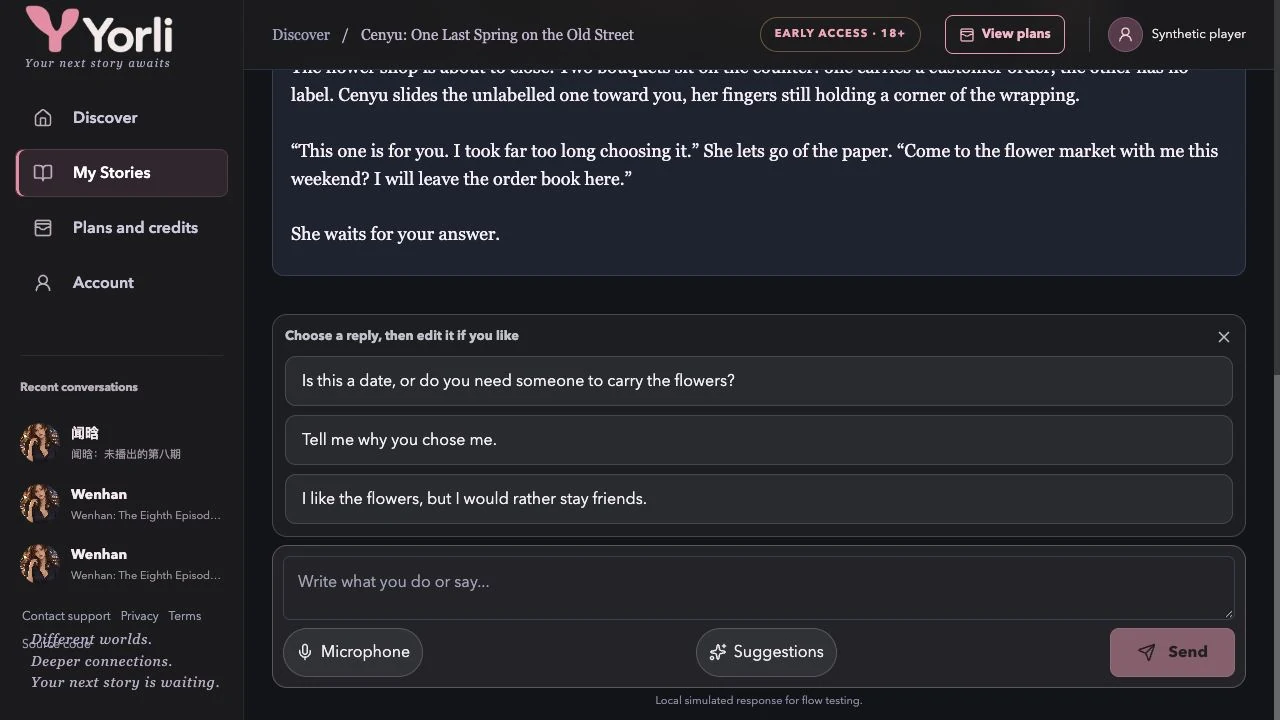
Start the conversation from the selected character's opening. One question, action, or answer is enough. For example, you could write:
I'd like to come along. What time were you thinking?
This is a reply idea you can edit, not a transcript of an AI response. Optional opening suggestions fill your draft; edit the wording and press Send when it says what you mean. A complete AI reply costs one credit.
Follow a Story moment where available
Wenhan's story also offers optional “Story moments”: free authored actions and results. Choosing one advances that scene. Free-text AI chat does not choose these actions for you, and a reply suggestion only fills your draft. You can use the story actions, chat freely, or combine them.
If you leave a scene and a “Return” action appears, choose it when you want to come back. This path is available in stories that provide it; other characters do not necessarily have the same moments.
4. Return to the same saved chat
Sign in to the same account and open My Stories. Choose your existing saved chat to continue. Rename it if you need to distinguish it from another conversation with the same character. Starting a separate chat creates a separate history.
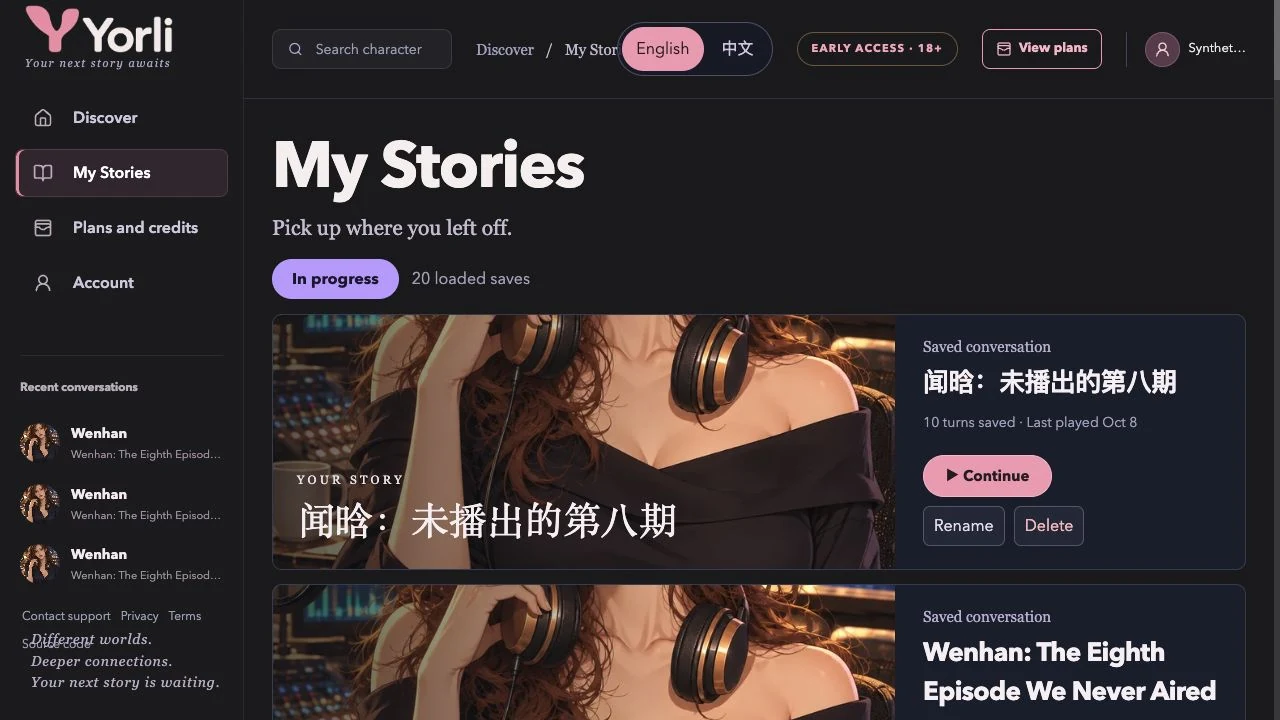
Reading saved history and asking for a new AI reply are different actions. New replies still need access and credits. Saved history does not mean the AI remembers every older detail; see identity and memory settings.
If you cannot continue
Check the error shown and your balance in Account. If a service error remains, use the support link in Account or email 15564412316@163.com with what you were trying to do and the error message.
Next: suggestions, alternative replies and credits · all frequently asked questions.